Does your AI writing editor change more than you asked it to?
Your AI writing editor should change only what you asked it to.
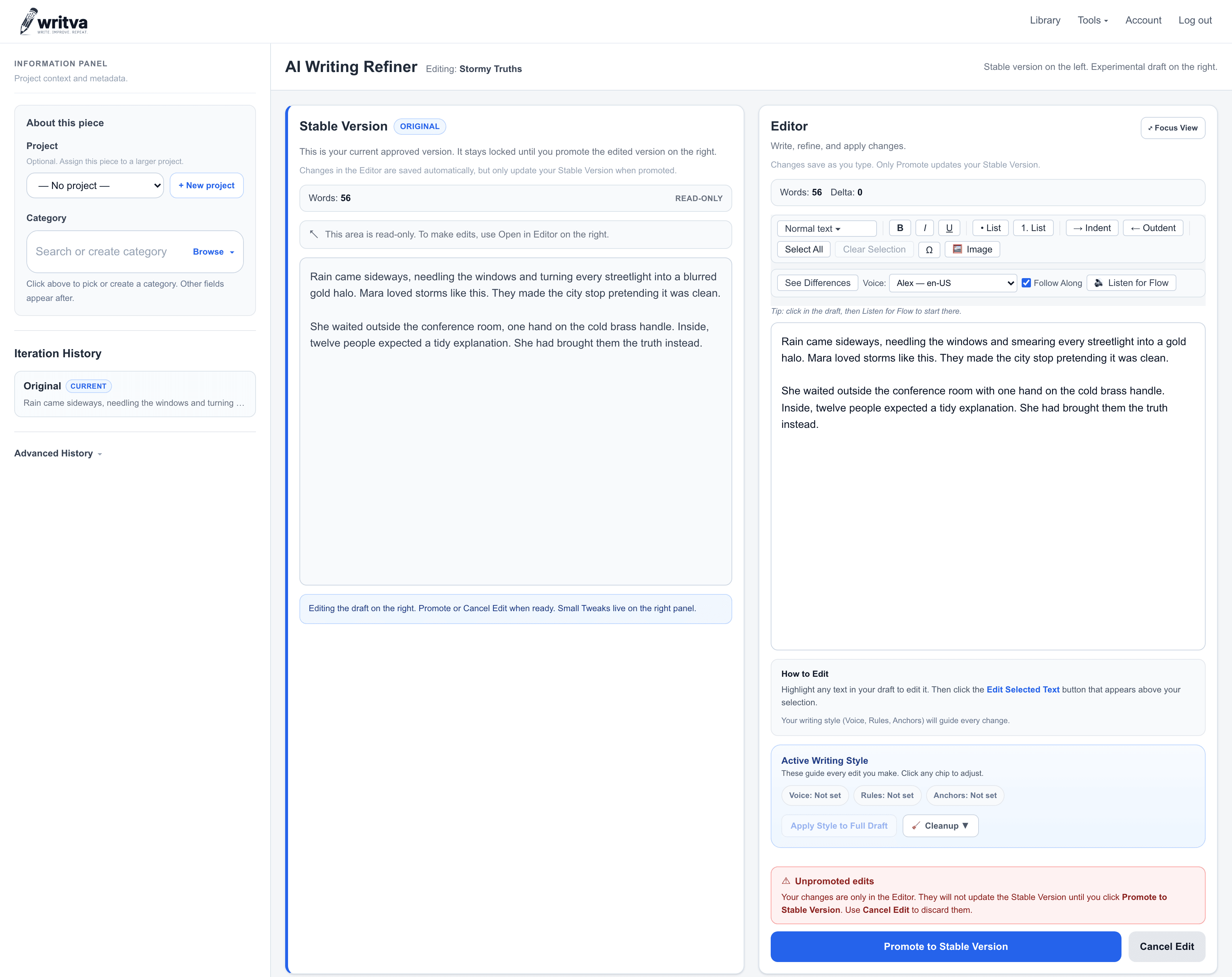
You ask for a clearer paragraph and get back a rewritten draft. Writva is built the other way round: it edits the passage you named, keeps the rest as you wrote it, and shows you the proposal beside your original before anything replaces it.
Editors and generators solve different problems
A generator answers the blank page. That is genuinely useful when you have nothing yet. But most writing time is not spent on the blank page — it is spent on the fourth pass through something that already mostly works.
At that stage, new text is not what you need. You need this paragraph clearer, that transition smoother, this claim stated more plainly, and everything else left exactly as it is. A tool that responds by regenerating the section is answering a question you did not ask.
How editing works in Writva
- Bring a draftPaste or write your text. It becomes your Stable Version — the copy of record.
- Choose what to work onThe whole piece, or one passage you select.
- Say what should changeGive an instruction in your own words, or pick an editing action.
- Review the proposalThe result appears in the Edited Version beside your original, not in place of it.
- Edit by handAdjust anything you want. The proposal is a draft, not a verdict.
- Promote when it is betterYour Stable Version updates, and the previous version stays in your history.
What Writva is good at — and what it is not
Well suited to
- Revising a draft you have already written
- Improving one passage without touching the rest
- Working through a long piece in passes
- Keeping a record of what changed and when
Not what it is for
- Generating a finished article from a one-line prompt
- Fact-checking or verifying claims in your writing
- Publishing or formatting for a specific platform
- Deciding for you whether a change is an improvement
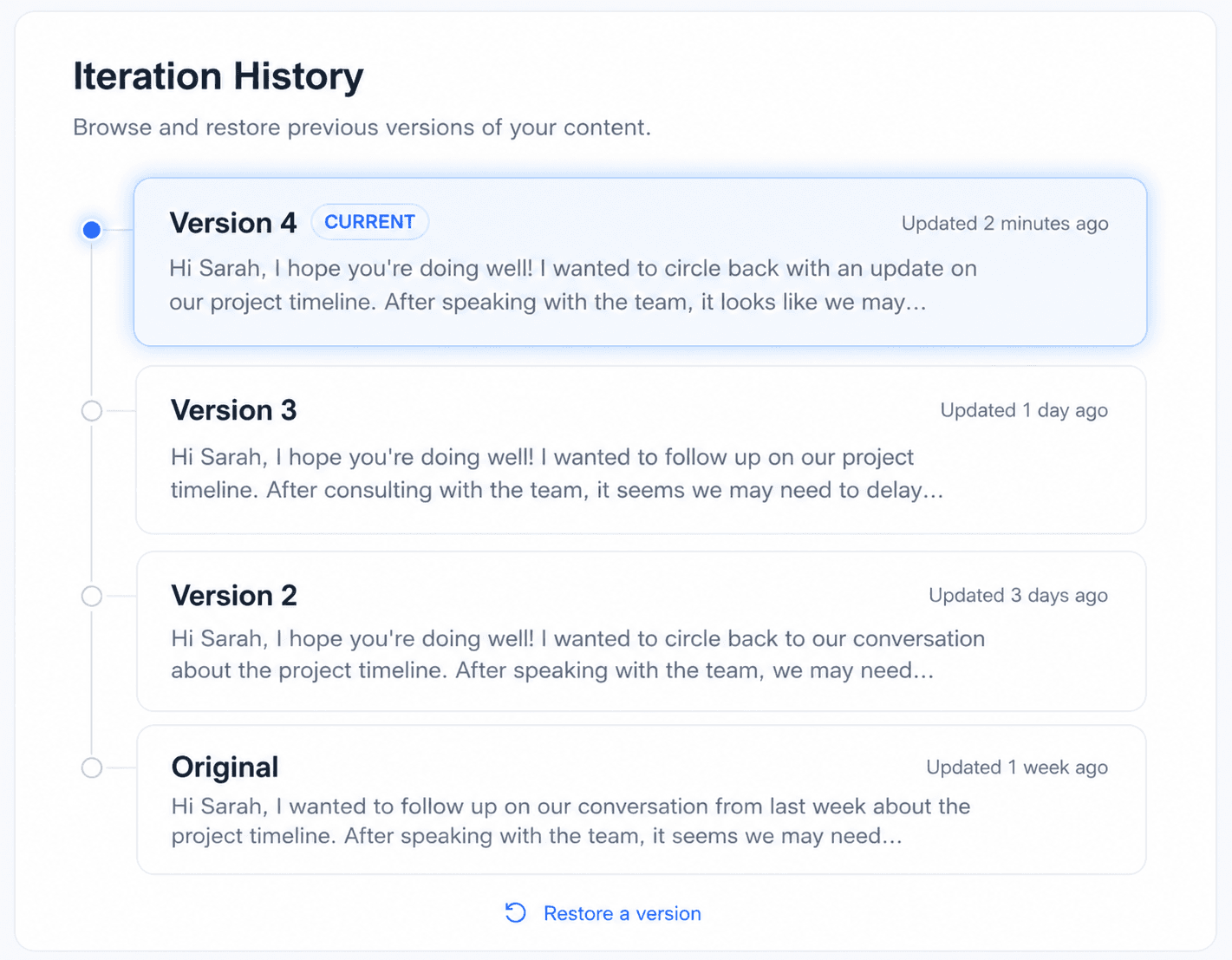
Comparing a proposal against the approved draft, promoting it, and getting an earlier version back are one connected workflow. If that is the part you care about, see how Writva keeps version history in full — or listen to your writing when you would rather judge a revision by ear than by eye.
What to keep in mind
- Writva assumes you already have a draft. If you are starting from nothing, a generator may serve you better first.
- Every suggestion needs your review. The tool proposes; you decide.
- Writva does not check whether anything in your writing is factually true.
- Results depend on your instruction — a vague request produces a vague edit.
- Your Stable Version stays as written until you Promote.
Common questions
What is an AI writing editor?
An editor works on writing that already exists: you bring a draft and it proposes changes to it. A generator starts from a prompt and produces new text. Writva is an editor — it assumes you have already written something you care about.
How is this different from a general AI chat tool?
A chat tool returns a block of text you then have to reconcile with your document by hand. Writva keeps your draft as the working surface: proposals appear beside your Stable Version, and you Promote them when you are satisfied.
Does it replace my draft automatically?
No. Your Stable Version is unchanged until you Promote a revision, and earlier versions remain in your history.
Can I edit just one part of a document?
Yes — that is the selected-text workflow. Highlight a sentence or paragraph and Writva works on that passage rather than the whole document.
Bring a draft and edit it properly
See what a tool feels like when it assumes you have already done the writing.
Related
- FeaturesWhere each Writva editing capability is explained.
- Version HistoryExperiment with a revision without losing the draft you already trust.
- Writing LibrarySave, find and organize writing with Projects, Categories, Tags and search.
- Improve a DraftThe workflow for revising something you have already written.
- For AuthorsLong-form drafting, revision, versions, and manuscript review.