Can an AI writing editor preserve your voice instead of flattening it?
An AI writing editor preserves your voice when it works from your sentences and shows you every change it made to them.
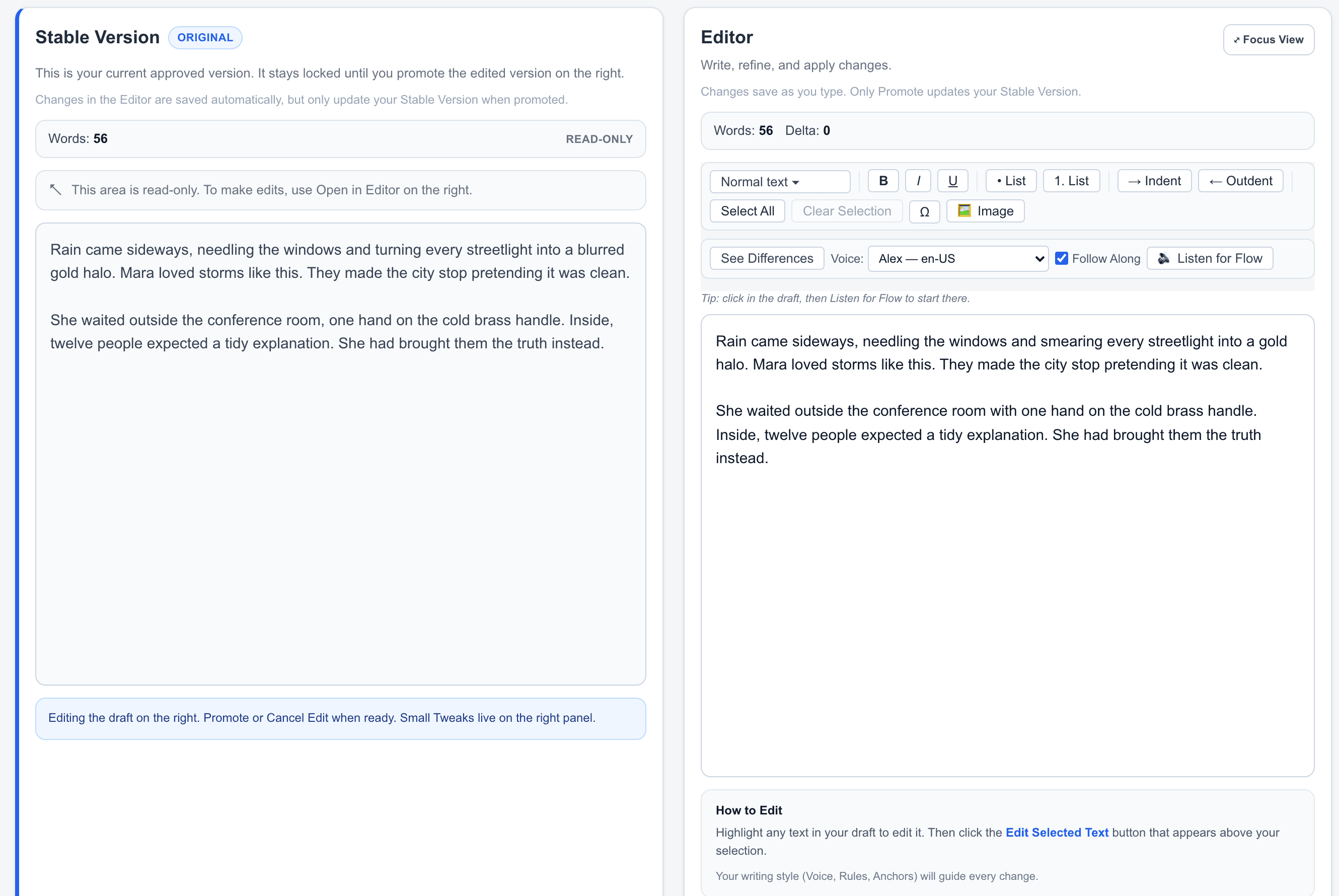
Writva is an AI writing editor that preserves your voice by working from your sentences instead of replacing them. Every suggestion appears beside your original, so you can see exactly what it did to how you sound.
Why AI editing so often flattens writing
Ask a general-purpose AI tool to improve a paragraph and it will usually write a new one. The result is often smoother — and noticeably less like you. The short sentence you used for emphasis gets folded into a longer one. The slightly odd word you chose on purpose gets swapped for the ordinary one. The rhythm evens out.
None of that reads as a mistake. It reads as competent, unremarkable prose, which is the problem: your draft has been improved into sounding like everyone else’s.
Voice is made of small, deliberate choices. A tool that regenerates from scratch has no way to know which of those choices you meant.
How Writva keeps your voice in view
- Start from what you wroteWritva edits the draft in front of it rather than generating a replacement from a prompt.
- Say what should changeAsk for clarity, tone, or length. The narrower your instruction, the less room there is for unrequested rewriting.
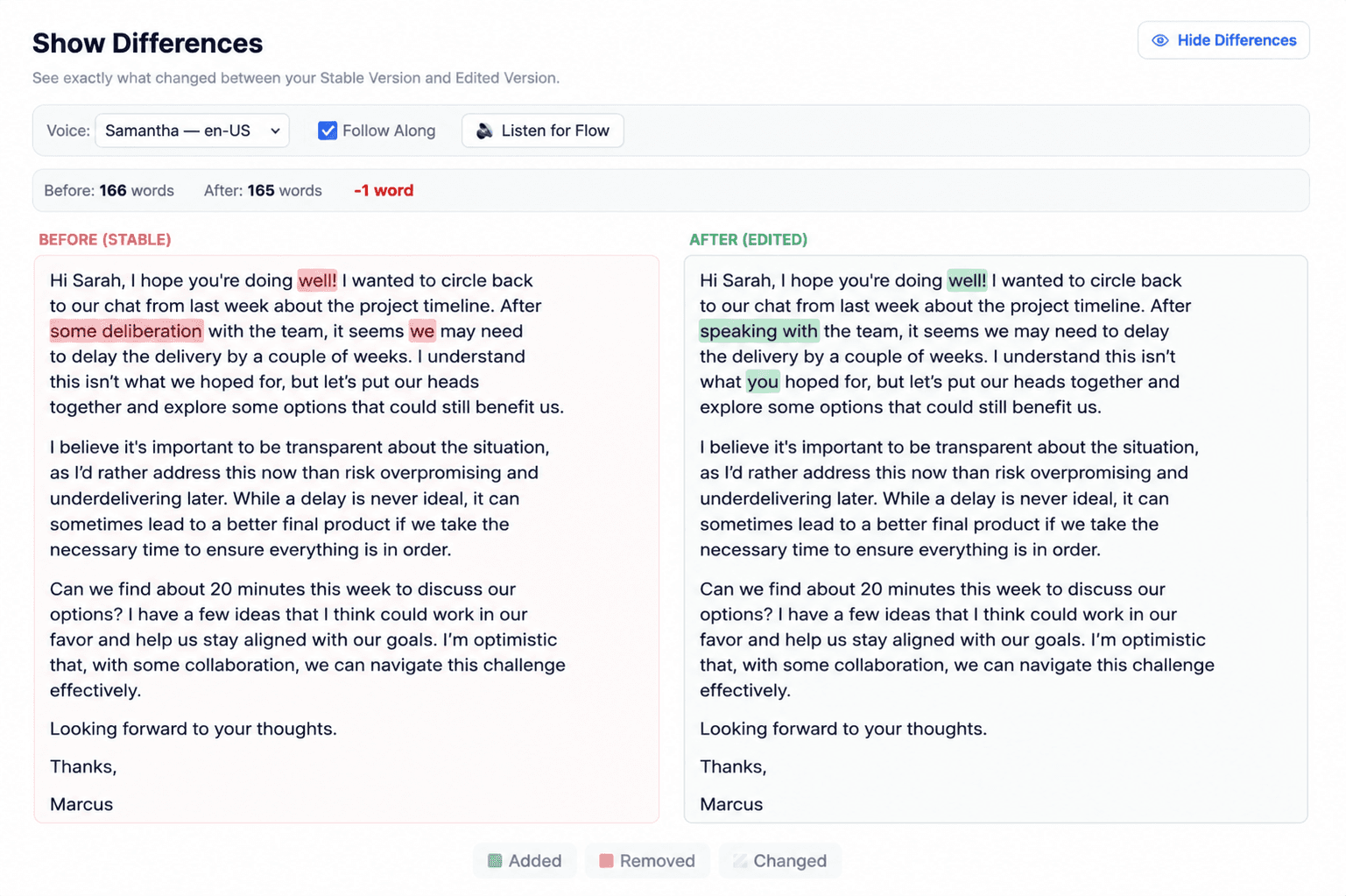
- Compare before acceptingThe proposal appears in the Edited Version beside your Stable Version, so a change in voice is visible rather than buried.
- Put your own words backKeep the sentences that already sounded right. The Edited Version is fully editable by hand.
- Promote when it sounds like youNothing replaces your draft until you decide it should.
Voice is something you set, not something Writva guesses
Everything above works with no setup at all. But if you want edits to aim at a particular way of writing rather than at generic correctness, you can say so explicitly — and it is worth knowing that three different controls do three different jobs.
Three controls, three jobs
All optional. You can edit a draft without touching any of them.
- Voice
- A named piece of writing you save in your Voice Library — usually your own, sometimes one of the starter voices. Attach one to a piece and Writva works toward its patterns: sentence rhythm, vocabulary, how direct it is, how much it hedges. Nothing is collected automatically; you save a Voice on purpose.
- Rules
- Mechanical constraints for the piece — no em dashes, no semicolons or colons, no contractions, no lists. Rules take precedence over Voice: if a rule says no em dashes, the edit honours the rule even when the Voice uses them.
- Saved settings (presets)
- A reusable bundle of the writing controls: writing type, tone, editing intensity, paragraph and ending style, length, grammar preferences. A preset is a saved configuration; a Voice is a saved sample of writing. They do different work, and you can use both together.
None of this changes what happens next. A Voice shapes the proposal; it does not accept it. The result still arrives in the Edited Version beside your Stable Version, and your draft still only changes when you Promote.
What changes, and what stays yours
Writva may adjust
- Clarity and flow where you asked for it
- Wording inside the passage you are working on
- A proposal you can rewrite before accepting
Writva leaves alone
- Sentences you did not ask it to change
- Your Stable Version, until you Promote
- Your earlier versions and history
- The final judgement about whether it still sounds like you
What to keep in mind
- A Voice is a target, not a guarantee. Matching a writing sample is approximation — Writva shows you what it produced, and whether it still sounds like you is your call.
- Rules take precedence over Voice, so a constraint you set for the piece will override the sample where the two disagree.
- A broad instruction invites a broad rewrite. Asking to “make this better” gives the model more latitude than asking to “tighten the second sentence”.
- Writva does not build a model of your style in the background. A Voice exists only because you saved one.
- Reviewing takes attention. The comparison only protects your voice if you actually read it before promoting.
- Your Stable Version stays as written until you Promote.
Questions about voice and AI editing
Will AI editing make my writing sound generic?
That is the risk with tools that regenerate a whole passage from scratch. Writva works from your existing sentences and shows the proposal beside your original, so a suggestion that has flattened your voice is visible before it is accepted rather than after.
Can I keep some sentences and reject others?
Yes. A proposal appears in the Edited Version, which is a normal editable draft. You can keep the parts that work, restore your own wording where you prefer it, and Promote the result when it sounds right.
Does Writva learn my voice automatically?
No. Nothing is picked up in the background. If you want Writva to work toward a particular voice, you save a writing sample as a Voice and attach it to the piece deliberately — otherwise Writva works only from the draft in front of it and the instruction you give.
What is a saved Voice?
A named piece of writing you keep in your Voice Library — often your own, sometimes one of the starter voices. Attach one to a piece and Writva works toward its patterns: sentence rhythm, vocabulary, how direct it is, how much it hedges. It is a target to aim at, not a guarantee of a match.
How is a Voice different from a saved preset?
A preset saves settings — writing type, tone, editing intensity, length, paragraph and ending style, grammar preferences. A Voice saves writing. The preset says how to approach the edit; the Voice is the example of how the result should sound. You can use both at once, and Rules take precedence over both.
What if the suggestion is worse than what I wrote?
Then do not Promote it. Your Stable Version is unchanged until you accept a revision, so rejecting a suggestion costs you nothing but the time it took to read it.
Edit the draft without editing out the writer
Bring something you have already written and see what changes — and what does not.
Related
- Listen for FlowHear awkward rhythm, repetition and flow while you review a draft.
- Selected-Text EditingChange one passage and leave the surrounding draft alone.
- How to Preserve Your Writing VoiceWhat to protect during revision, and how to spot when it is gone.
- How to Edit Selected Text With AIThe method: scope, instruction, review, accept.
- For AuthorsLong-form drafting, revision, versions, and manuscript review.