
What should AI book writing software do while you are still writing the book?
It should keep the project organized — structure, drafts, revisions and review copies in one place — and leave the writing to you.
Book Builder is AI book writing software for the part nobody talks about: keeping a long project organized while you write it. Structure, source material, drafts, revision, manuscript reading and review copies all live in one project — and you decide what each one contains. The same machinery holds an essay, a paper or a course.
Why book-length projects outgrow a chat window
A chat window has no memory of your book’s shape. There is no chapter three to point at, no sense of what part two already established, and no record of the version you liked in March. Every request starts by re-explaining a project the tool cannot see.
The problems that actually sink long projects are organizational: not knowing where a section belongs, discovering you explained the same idea twice, losing a draft you wanted back. Those need structure, not a better prompt.
Capture and connect the material
Books start scattered — notes, half-drafted sections, an article you wrote two years ago that turns out to be chapter six. You can bring existing material into a project and attach it where it belongs, so the raw material and the structure are in the same place instead of across four apps.
Ideas can be linked to the project too, so a thought you had while working on chapter two is still findable when you reach chapter nine.
Define a structure that fits the project
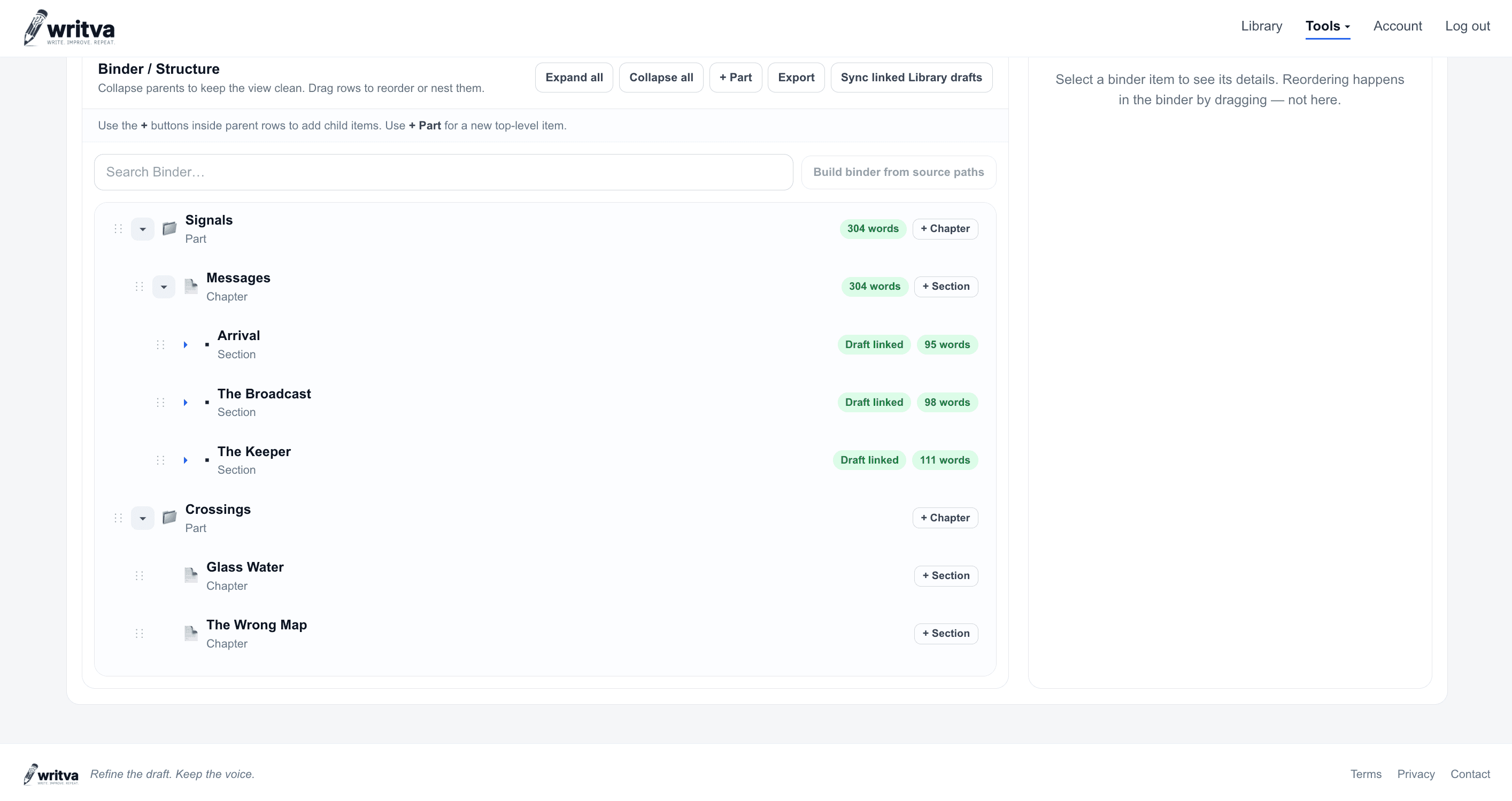
The Binderholds your project’s hierarchy, and you name the levels. A memoir might use Parts and Chapters; a novel Acts, Chapters and Scenes; a textbook Units and Lessons. You can go up to four levels deep, and the lowest level is always where writing happens.
The name is literal but the tool is not — anything long enough to need a structure works the same way. A new project starts from one of these shapes:
- A book — Parts, Chapters and Sections
- An essay or paper — a single tier of Sections
- A research project or report — Sections and Subsections
- A course or series — Units and Lessons
- Something else — name your own levels in the Binder
Those are starting points, not categories: each one only decides which levels your Binder opens with. Nodes can be dragged, renamed, nested and reordered afterwards, and a writing unit carries its linked draft with it. The structure is expected to change — that is what the early months of a long project are.
Write each unit in the editor, not in a wall of text
- Each writing unit links to its own draftA chapter is a real thing you can open on its own, with its own history.
- Write and revise in WorkspaceThe same editor used for any Writva piece — with a way back to the Binder when you are done.
- Stable and Edited stay separateYour approved draft is not overwritten while you experiment with a revision.
- Promote when you mean itAccepting a revision is a decision, and the previous version stays in your history.
Because each unit is an ordinary Writva piece, it also appears in your Writing Library, which helps you manage saved pieces across projects. The two systems stay separate on purpose: the Binder decides a book’s structure and reading order, while the Library organizes and searches saved writing. Linking a piece to a book does not move it out of your Library, and a Library project is not a book.
Keep track of a project too big to hold in your head
By month five a long project has more moving parts than you can remember: a section you drafted twice, a note you filed somewhere sensible, a chapter whose job has quietly changed. Talk and Project Guidance answer from the project itself — the structure you built and the drafts you approved — rather than from a blank prompt.
The Binder and your approved drafts stay the record of what the project is; an answer here is orientation, and it can be incomplete. When you move from finding your way around the project to changing what a chapter actually says, that is the AI book editor side of the work.
Read the book in order
Preview Flow reads the Binder in sequence and shows the current approved draft of each unit as continuous manuscript. You can jump to a location, search for one by name, return to where you left off, and have it read aloud while you follow along.
Reading in order is when pacing problems and accidental repetition appear — the ones that stay invisible while you work chapter by chapter.
Get a copy out for readers
When a draft is ready for someone else, export the whole book or selected chapters as a Word document, Markdown or plain text, or produce a review PDF through your browser’s print dialog. Exports use each unit’s current approved draft, in Binder order. These are review copies for readers and editors — not typeset books.
A realistic sequence
- Bring material inNotes, drafts and existing pieces.
- Shape the BinderName your tiers and lay out the book.
- Link writing unitsEach unit gets its own draft.
- Write and reviseWork unit by unit in the editor.
- Promote deliberatelyApprove changes; keep the history.
- Read it throughCheck flow and repetition in order.
- Export for readersProduce a review copy.
What Book Builder does not do
- It does not write your book. It organizes, assists and preserves the work you do.
- It does not decide your structure. Suggestions are proposals; you accept, adjust or ignore them.
- It does not move or delete your material on its own.
- It does not verify facts, sources or quotations.
- It does not guarantee it will notice every continuity problem or repetition in a long manuscript.
- It does not produce typeset or print-ready books, and it does not handle publication layout, EPUB, ISBNs or distribution.
Before you build the structure
Book Builder holds a structure. Deciding what that structure should be is a separate job, and these are about that.
- How to Organize a Nonfiction BookGetting from scattered material to an argument in order.
- How to Outline a BookA flexible outlining method for planners and discovery writers.
- Nonfiction Book Outline TemplateA fill-in framework for planning a nonfiction book, whole on the page.
Questions about Book Builder
Does Writva write the book for me?
No. Book Builder is for organizing, revising, reviewing and keeping control of a book you are writing. You decide the structure, and you decide what becomes the approved draft.
What structure does it expect?
Whatever yours is. You name the tiers — Parts and Chapters, Acts and Scenes, Units and Lessons — up to four levels deep. The lowest level is where writing happens; the levels above it are organization.
Is it only for books?
No. A new project can start as a book, an essay or paper, a research project or report, a course or series, or a custom shape you name yourself. That choice only decides which levels your Binder opens with — the organizing, drafting, revision and review work the same way regardless.
Can I reorganize the book later?
Yes. Nodes can be renamed, reordered and nested, and a writing unit keeps its linked draft when it moves. Structure is meant to change as the book becomes clearer.
Where does the actual writing happen?
In Workspace, the same editor used for any Writva piece. Each writing unit links to its own draft, so you open a chapter directly rather than scrolling one enormous document — and you can return to the Binder from there.
How is this different from the AI Book Editor?
Book Builder is where the project lives: the structure, the material, and which draft of each unit is the approved one. The AI book editor is what you do inside a unit once it has words in it — revising a chapter or a passage and reviewing the change before you accept it. Same project, different job.
Start with the structure you already half-know
Lay out the parts you are sure about and let the rest of the book find its shape as you write.
Related
- AI Book EditorAI-assisted editing of a manuscript that already exists.
- Manuscript Revision SoftwareThe whole revision system, from structure to review copy.
- For AuthorsLong-form drafting, revision, versions, and manuscript review.
- For Nonfiction WritersArguments, claims, evidence and chapter structure for nonfiction.